



Nico Röpnack · 27. Februar 2026 · 7 Min. Lesezeit
Am 26. Februar 2026 haben wir live gezeigt, was passiert, wenn Claude AI direkt auf Smartsheet-Daten zugreift: über das Model Context Protocol (MCP), die neue Schnittstelle, die KI-Modelle mit externen Datenquellen verbindet. Das Ergebnis: 38 Fragen in 30 Minuten, 4 Dashboards in Echtzeit, eine Frage alle 47 Sekunden. Kein PowerPoint, kein Skript, alles live.
Fragen in 30 Minuten
Lighthouse Consultings Webinar, 26. Februar 2026
Was ist MCP?
Das Model Context Protocol (MCP) ist eine offene Schnittstelle, über die KI-Modelle wie Claude direkt auf externe Datenquellen zugreifen: Smartsheet, Datenbanken, APIs. Statt Daten manuell zu kopieren, liest Claude die Smartsheet-Daten live aus und erstellt Dashboards, Analysen und Prognosen in Sekunden. Das Webinar hat genau das demonstriert.
Das Format
Coffee to Go:
Micro-Learning in 30 Minuten
Die meisten Webinare folgen einem einfachen Muster: Begrüßung, Präsentation, Q&A, alle gehen. Wir haben bewusst das Gegenteil gemacht: Claude AI per MCP (Model Context Protocol) live an Smartsheet angebunden und in Echtzeit Dashboards, Analysen und Prognosen generiert. Wer regelmäßig von solchen Praxisdemos profitieren möchte, findet alle Termine in der Webinar-Übersicht von Lighthouse Consultings.
Format 01
30 Minuten Gesamtlänge
3 Min. Intro, 25 Min. Live-Demo, 2 Min. Q&A. Kein Puffer. Kein Füllmaterial. Jede Minute zählt.
Format 02
Live-Demo ohne Skript
Kein PowerPoint. Kein vorbereitetes Skript. Alles live, alles echt, alles in Echtzeit vor den Augen der Teilnehmer.
Format 03
4 Dashboards in 25 Minuten
Vier vollständige, interaktive Dashboards. Live gebaut. Das Ergebnis: 38 Fragen aus dem Publikum, eine alle 47 Sekunden.
Die Zahlen
Rekord-Engagement:
Was die Metriken zeigen
Teilnehmer live
Fragen beantwortet
Länder vertreten
Attendance Rate
78 Anmeldungen, 36 Teilnehmer live, fast alle blieben die kompletten 30 Minuten.
Die Dashboards
Was wir gebaut haben:
4 Dashboards in 25 Minuten
Live. Ohne Vorbereitung. Mit echten Daten aus Smartsheet.
Dashboard 01
Project Kanban Board (2 Minuten)
“Here’s my project portfolio dataset from Smartsheet. Please analyze completely and create an interactive dashboard with KPIs and charts.”
Ergebnis: Ein vollständiges Kanban-Board mit allen 25 Projekten. Status-Indikatoren. Budget-Ampeln. Ressourcen-Auslastung. Die Reaktion im Chat: “OMG.. That’s amazing.”
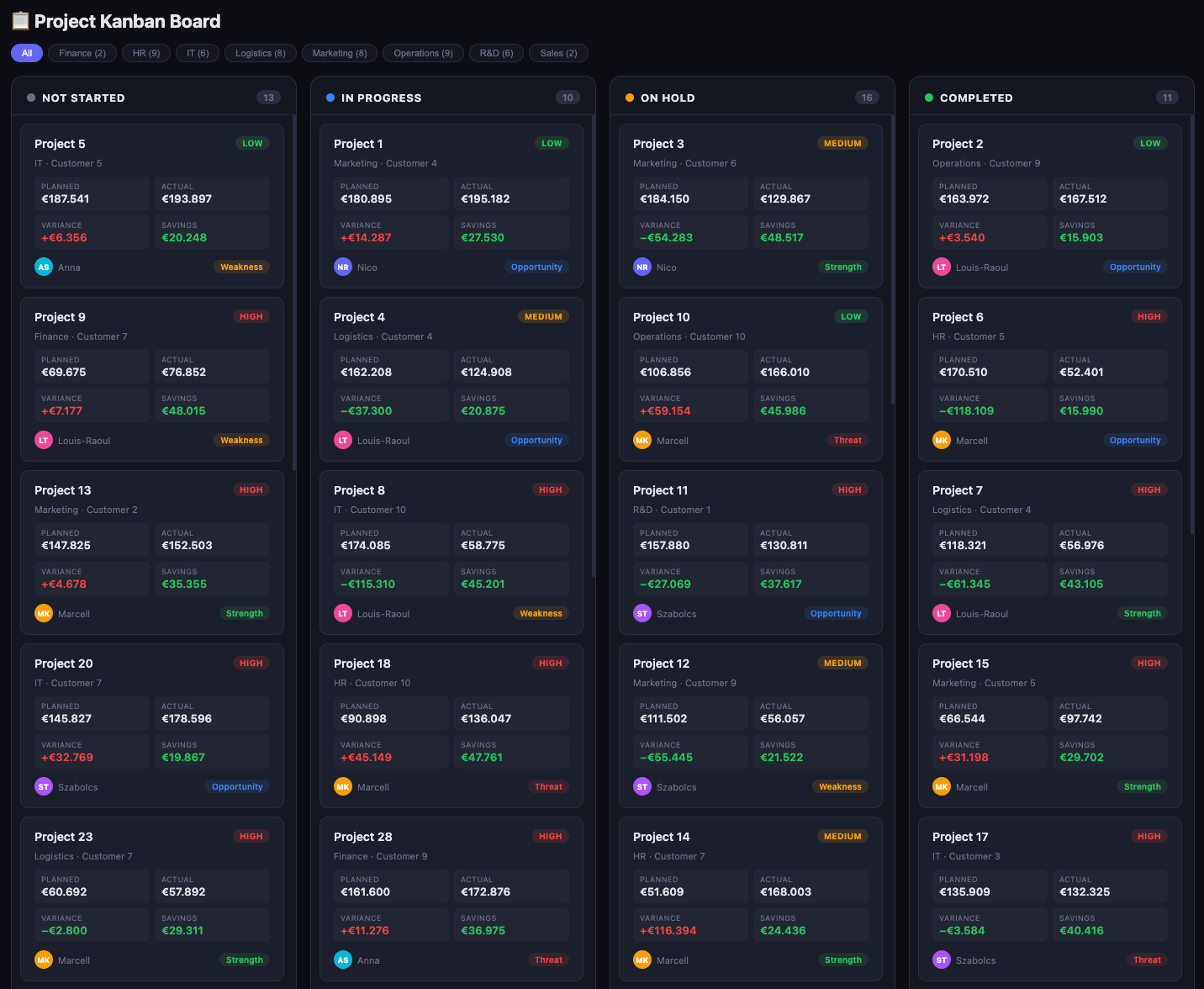
Dashboard 01: Project Kanban Board, live gebaut in 2 Minuten
Dashboard 02
Top 3 Project Managers by Savings (90 Sekunden)
“Wer sind die Top 3 Projektmanager nach Einsparungen?”
Ergebnis: Ein Leaderboard. Szabolcs Toth auf Platz 1 mit 439.133 Euro Einsparungen über 14 Projekte.
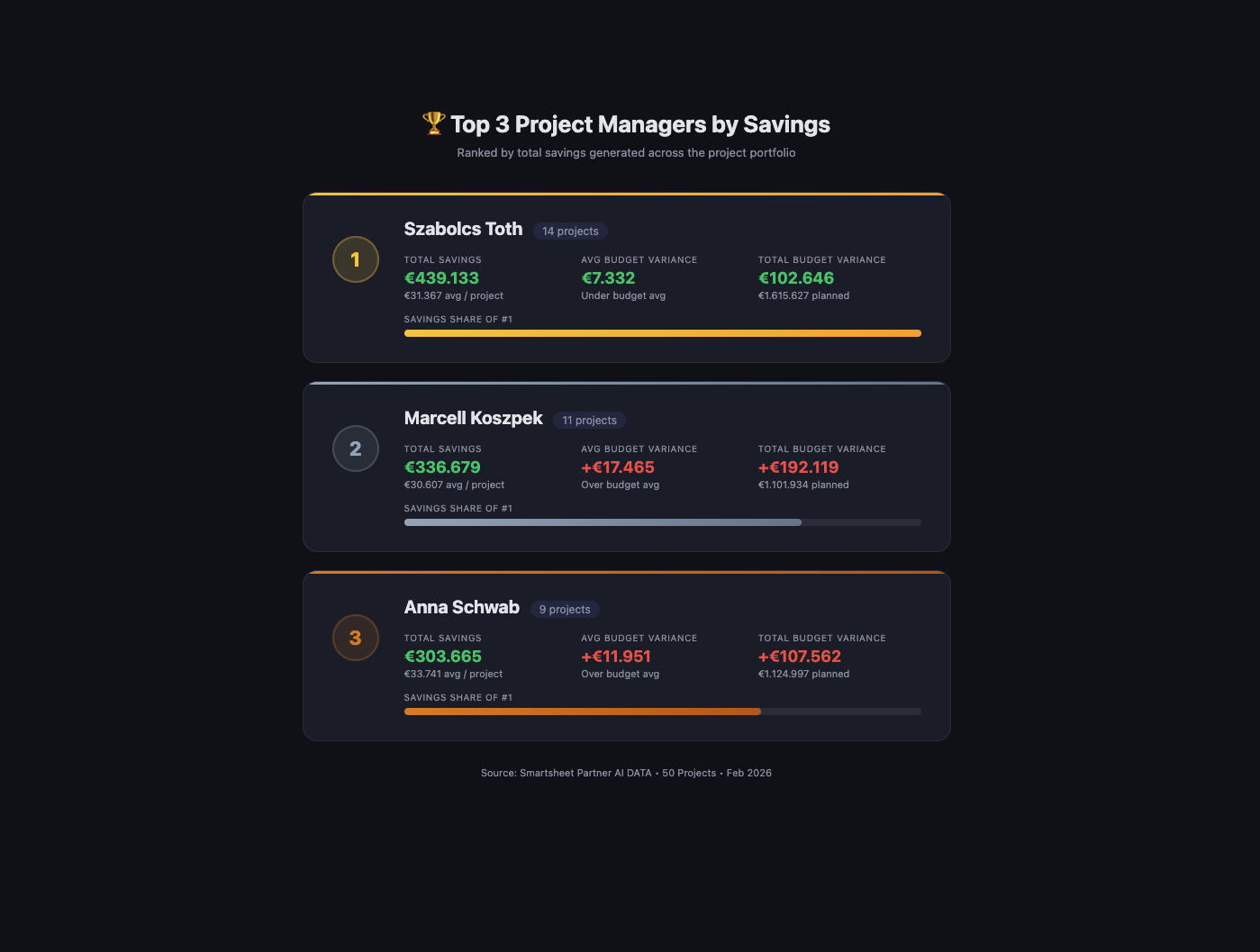
Dashboard 02: Top 3 Project Managers by Savings
Dashboard 03
Executive Portfolio Dashboard (3 Minuten)
“Erstelle ein Executive Dashboard mit Charts für Status, Budget, Risiken und Timeline.”
Ergebnis: 6 verschiedene Visualisierungen. Donut-Charts, Bar-Charts, Timeline, Risiko-Ampeln, Ressourcen-Auslastung, Projekt-Liste. Alles interaktiv.
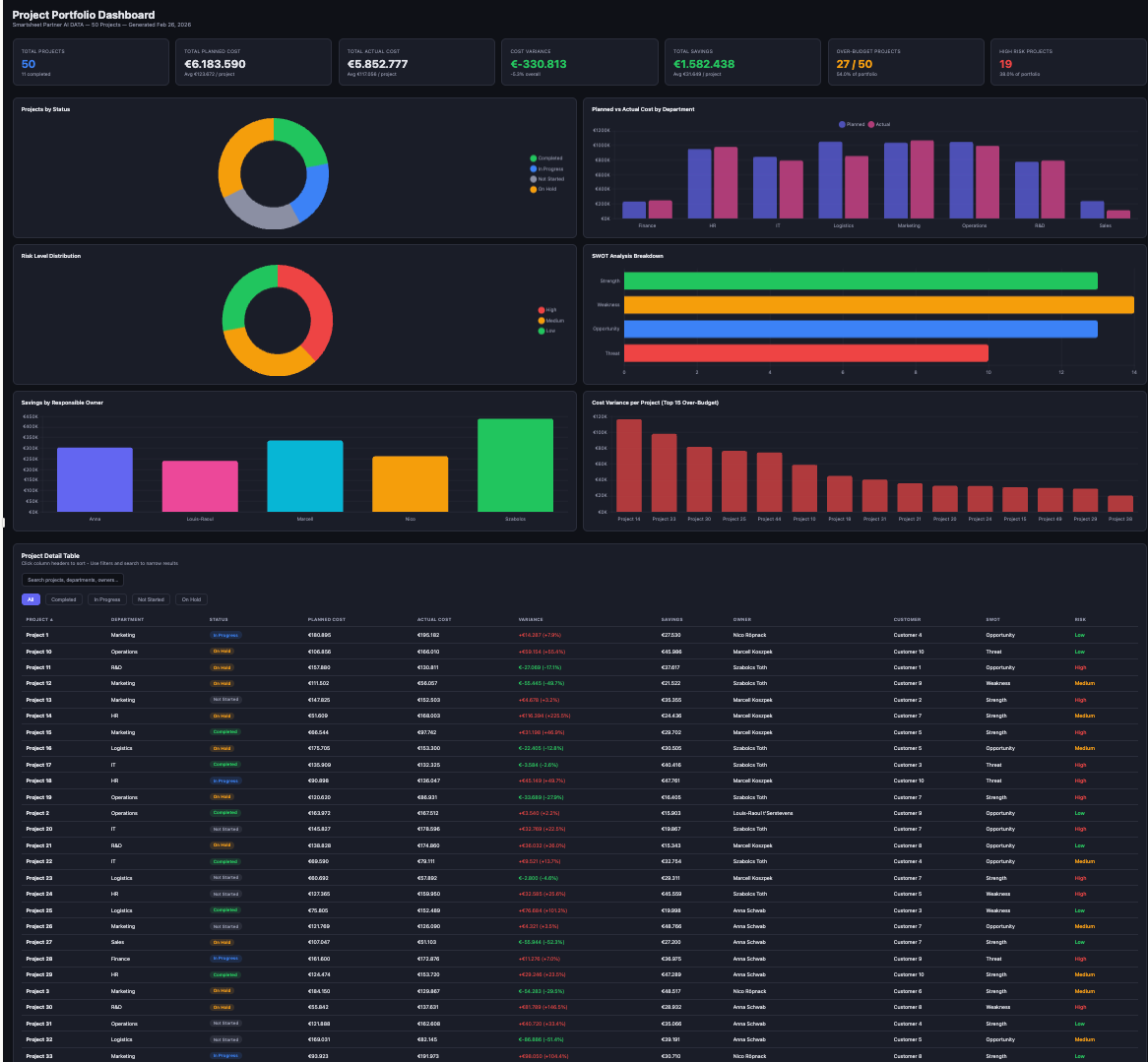
Dashboard 03: Executive Portfolio Dashboard mit 6 Visualisierungen
Dashboard 04
Budget Variance Analysis (2 Minuten)
“Analysiere Budget-Varianzen und zeige mir, welche Projekte am meisten vom Plan abweichen.”
Ergebnis: Ein Ampel-System. Grün: im Budget. Gelb: leicht überzogen. Rot: kritisch. Sofort handlungsfähig für jede Führungsebene.
Die Fragen
Was die Teilnehmer
wirklich wissen wollten
38 Fragen. Alle beantwortet. Hier die fünf, die am häufigsten gestellt wurden.
“Speichert Claude meine Smartsheet-Daten?”
Nein. Mit Claude Team oder Claude Enterprise werden Daten nicht für Training verwendet. Keine Speicherung. Kein Training. SOC 2 Type II zertifiziert.
“Kann ich das in Smartsheet einbetten?”
Ja, via Web Content Widget. Claude-generierte HTML-Dashboards können direkt eingebettet werden. Mit Published Sheets sind die Daten live.
“Funktioniert das auch mit tausenden Zeilen?”
Ja. Getestet mit 5.000+ Zeilen. Performance bleibt gut. Empfehlung: vor der Übergabe vorfiltern für noch bessere Ergebnisse.
“Ist das wirklich so einfach?”
Ja. 2 Minuten von der Beschreibung zum fertigen Dashboard. Kein Code. Kein Spezialistenwissen. Nur ein klarer Prompt.
“Wo ist die Grenze von Claude?”
Bei komplexen verschachtelten Formeln. Bei 5 verschachtelten IF-Statements braucht Claude manchmal 2-3 Iterationen. Für 90% der Use Cases funktioniert es beim ersten Versuch.
Die Erkenntnisse
Was wir gelernt haben:
3 Erkenntnisse aus 38 Fragen
Erkenntnis 01
Fragen kommen während der Demo
Minute 15 bis 25 war die höchste Frage-Dichte des gesamten Webinars. Nicht am Ende. Nicht in der Q&A. Mitten im Tun.
Erkenntnis 02
Menschen wollen den Prozess sehen
Live-Demo schlägt fertige Präsentation. Nicht das Ergebnis überzeugt. Der Weg dorthin. Das Entstehen in Echtzeit.
Erkenntnis 03
Fehler schaffen Vertrauen
Claude hat einmal einen Chart nicht richtig positioniert. Wir haben es live korrigiert. Das hat mehr Vertrauen geschaffen als eine perfekte Demo je hätte.
Die Prompt-Progression
16 Schritte:
Von Daten zu Strategie
Die vollständige Prompt-Sequenz aus dem Webinar: von der ersten Analyse bis zum strategischen Partner.
Phase 1: Erster Kontakt
“Here is my project portfolio dataset from Smartsheet. Please analyze it completely and create an interactive HTML dashboard with key KPIs, charts, and a summary table.”
Phase 2: Visuell verfeinern
“Add a bar chart comparing Planned Cost vs. Actual Cost for every project. Highlight projects where Actual Cost exceeded the budget in red.”
“Add interactive filter buttons.”
Phase 3: Analytics vertiefen
“Who are the top 3 project managers by total Savings generated?”
“Run a correlation analysis and visualize as scatter plot.”
Phase 4: KI-Beratung aktivieren
“Predict the likely Actual Cost for a new project with Planned Cost of $150,000.”
“Act as my strategic advisor. Give me 3 concrete recommendations.”
Phase 5: Kanban-View erstellen
“Create an interactive Kanban board with columns: Backlog, In Progress, Review, Done.”
Phase 6: Anti-Hallucination Loop (Gamechanger)
“Please explain exactly how you calculated the Risk Score.”
“Challenge your own analysis. What assumptions could be wrong?”
Prompt 16 ist der Moment, in dem Claude zum denkenden Partner wird.
Nächste Schritte
Kommende Webinare:
März und April 2026
März 2026
Projektpläne mit Claude automatisieren
Von der Idee zum strukturierten Projektplan: wie Claude Planung und Dokumentation übernimmt.
März 2026
Control Center Deep Dive
Das Smartsheet Control Center vollständig verstehen: Portfoliosteuerung auf Unternehmensebene.
April 2026
Data Privacy & KI für regulierte Branchen
DSGVO, SOC 2, regulierte Branchen: was KI-Einsatz in der Praxis wirklich bedeutet.
Nächster Schritt
Selbst erleben, was in 30 Minuten möglich ist
Fordern Sie die Aufzeichnung an oder buchen Sie eine persönliche Demo, um Claude und Smartsheet in Ihrer eigenen Umgebung zu testen.
