potential analysis
consultingScenario planningReal-time budget and capacity scenariosDigital Obeya & KPIsOne dashboard replaces 10 status meetingsResource managementKnow what your experts are working onPortfolio managementAll projects under control, not just the loudest onesProcess automation60% fewer status emails from day oneMulti-project managementExternal PMO as a serviceKaizen Management SystemContinuous Improvement with SmartsheetAI Agents in the WorkplaceWhere does your small or medium-sized business stand with Agentic AI?
profitabilityImprove profitability5 levers for greater profits in manufacturingChange ManagementPricing changes, increasing EBITS&OP / SIOPSynchronizing sales and productionCost reductionSystematically reducing costsCash flow managementDigitize contracts, secure cash flow
platformsSmartsheetPremier Solution Partner: Consulting & Implementationn8n AutomationWorkflow automation, GDPR compliantKNIME Data AnalysisData analytics without programmingSmartsheet + n8nThe Lego principle: 400+ integrationsGate Review System5-phase project governanceSmartsheet EU MigrationData migration to the EU region, GDPR-compliantSmartCapacityIntelligent Resource Management for Smartsheet
Free ToolsFlinktextDictation app for macOS: speak instead of typing, local and privateCAPEX CalculatorEvaluate and Prioritize InvestmentsProject ProfitabilityROI Calculation for Your ProjectsProfit Leak FinderWhere is your company losing margin?Team Capacity PlanningWeekly Planning for Small BusinessesWeekly PlannerFree interactive weekly plannerDashboard → PPTXExport Smartsheet dashboardsNIS2 Readiness CheckCheck where your business stands in just a few minutes
blogStart potential analysis

Claude Partner · GDPR-compliant · In German

Claude Basics: The Hands-On Course—Go from experimenting to having your own assistant in two weeks.

No more AI courses where you just sit back and watch. You'll build your own personal Claude assistant step by step for a real, recurring task. 32 concise lessons, 15 minutes a day.

  • Lifetime Access
  • 32 micro-lessons
  • Exercise data included
  • Certificate
  • Personalized Course Support

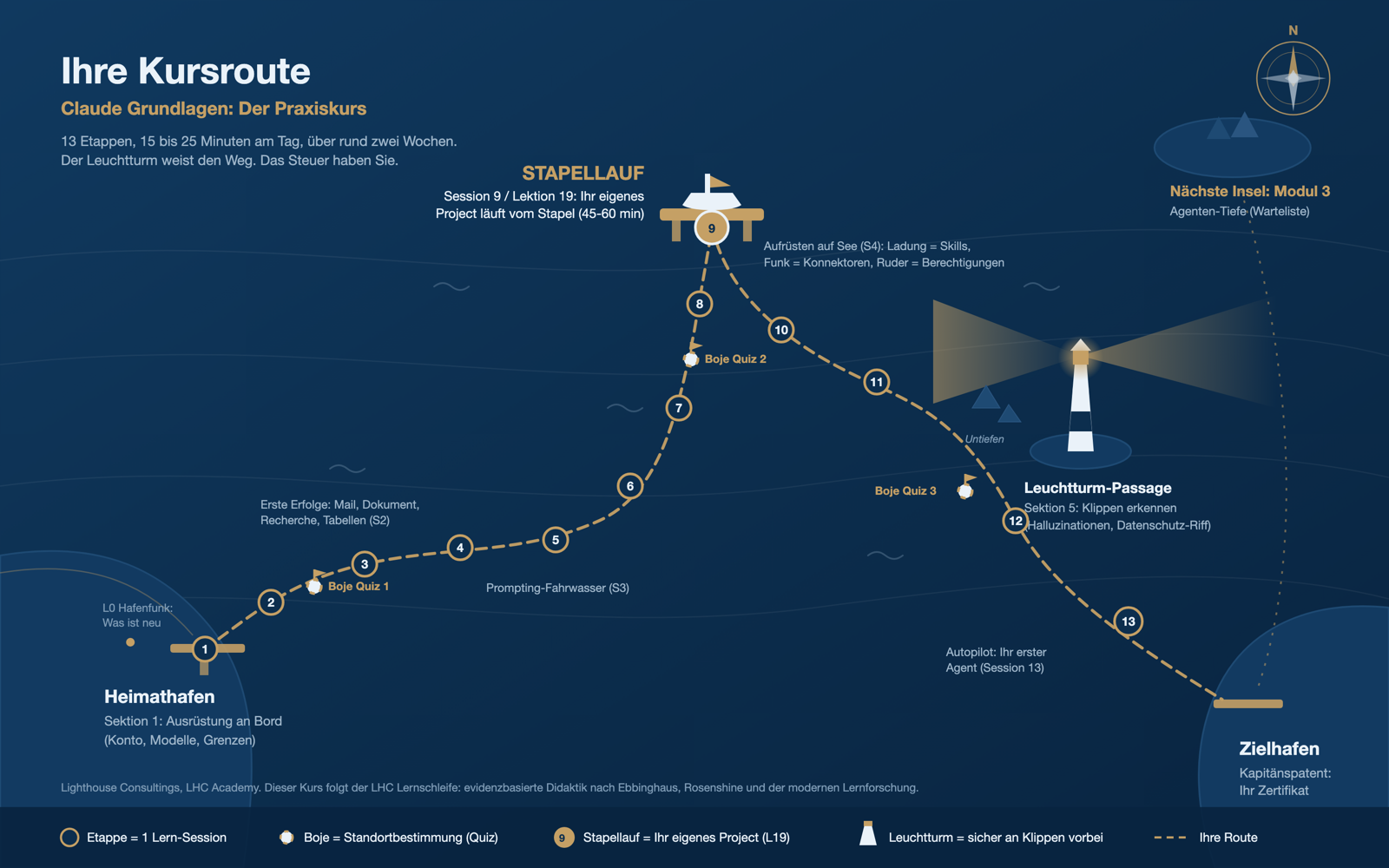
Course Route as a Nautical Chart: 13 Stages from Home Port to Destination Port, with Certificate

They've tried AI. It hasn't saved them any time yet.

You know how it is: the same old desk work eats up hours every week. Emails, reports, spreadsheets, research. You open an AI tool, ask a few questions, get a useful result, and then start from scratch again the next time.

It's not your fault, and it's not the tool's fault. It's because most people use AI like a search engine: ask once, copy the answer, and that's it. The real potential goes untapped.

On top of that, there are the unanswered questions that cause many small and medium-sized businesses to hesitate: What data am I even allowed to enter? Which plan is GDPR-compliant? And how do I know the answer is correct?

This course answers exactly that. Honestly, in German, using your own material.

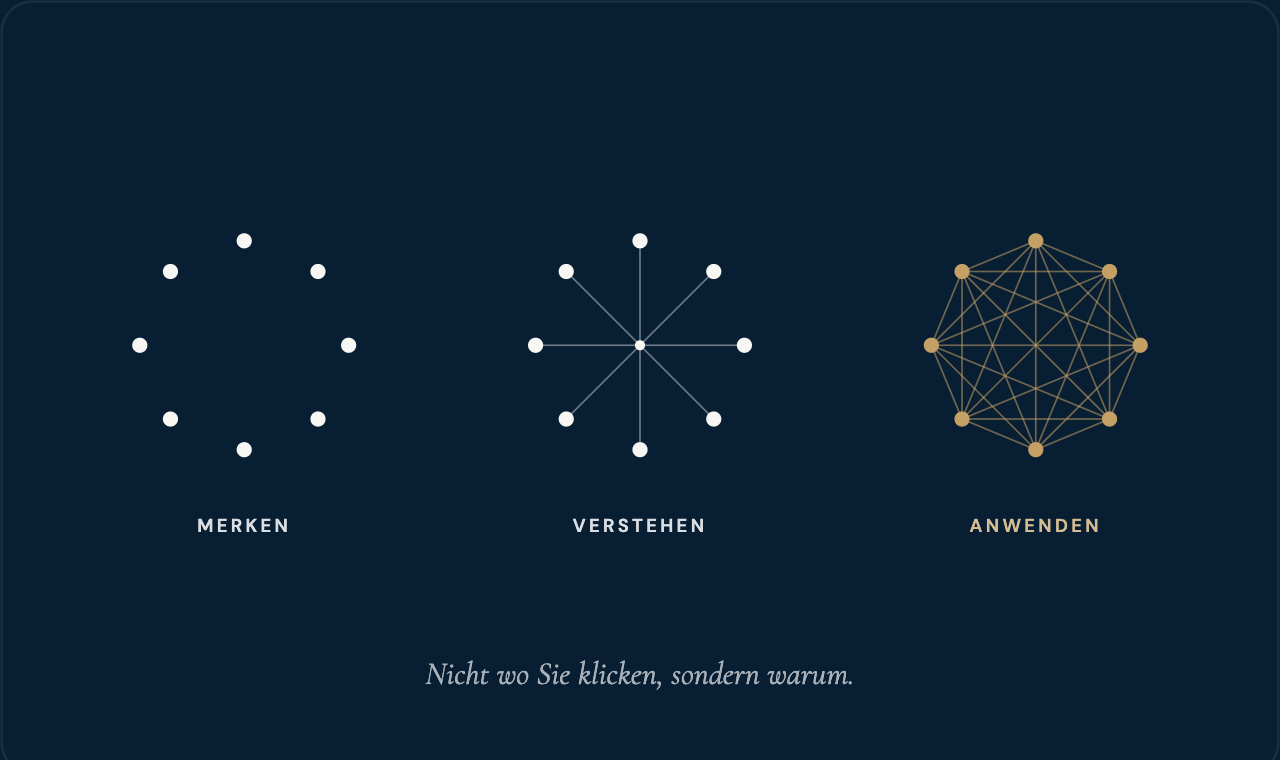
Notice, Understand, Apply: From Isolated Points to a Fully Interconnected Network

The Metamorphosis

In the end, you don't have knowledge. You have an assistant.

The difference between “I saw a video once” and “I use it every week” is the setup. Once you set up Claude properly—with your own context, your own rules, and your own knowledge—you’ll save hours every week from then on.

That's why, in this course, you won't be building a demo project—you'll be building your own: a reusable Claude Project for a real, recurring task from your everyday work. Set it up once, use it over and over again.

By the end, you will be able to:

  • Solve a real-world problem using a structured prompt and make targeted improvements, rather than starting over from scratch.
  • Create your own Claude Project with context, rules, and knowledge, including your own skill and a connected tool with carefully configured permissions.
  • For each task, decide: Claude—yes or no? Which data can be included (GDPR and EU AI Act traffic light system), and how you will verify the result.

Designed for everyday work, not for the IT department.

This is right for you if

  • You work in a small or medium-sized business: as a specialist, team leader, or executive.
  • You don't use AI at all yet—or only occasionally—and want to finally get organized.
  • You work with sensitive data and need to know what is permitted.
  • You need an invoice and a certificate for your continuing education budget.

Probably not, if

  • If you're a developer looking for a deep dive into Claude Code or the API, this course will focus specifically on chat and coworking.
  • If you're expecting a course that's just a series of instructions without any hands-on practice, think again. Here, you'll work on your own material at every stage.

Explained in 90 seconds

Your instructor will show you the route.

What to expect, how the 13 stages are structured, and why the launch in Lesson 19 is the highlight of the course: Nico Röpnack guides you through the nautical chart.

1:35 minutes, with sound.

The Course at a Glance

Six stages, a clear path.

You start with a solid foundation and end up with your own assistant. The order is no coincidence; it follows the natural learning curve: first, orientation; then, initial successes; and finally, the tools that make all the difference.

  • 1Orientation and Setup. Understanding the Claude ecosystem, choosing the right plan and model, and clarifying GDPR and AVV requirements.
  • 2First real assignments. Email, summaries, research using sources, tables, artifacts, and collaboration. Your first immediate successes.
  • 3Prompting. The prompt that works the first time—and how to refine it effectively.
  • 4Knowledge and Tools. The core: Your own project, your own skill, an integrated tool, and permissions under control.
  • 5Limits and Safe Use. Recognizing and Grounding Hallucinations: The Data Traffic Light for Every Workday.
  • 6Outlook and Conclusion. Planned Tasks, Your First Agent, Your 7-Day Plan, and Your Certificate.

32 micro-lessons ranging from 5 to 10 minutes, three mid-course quizzes, and a final test.

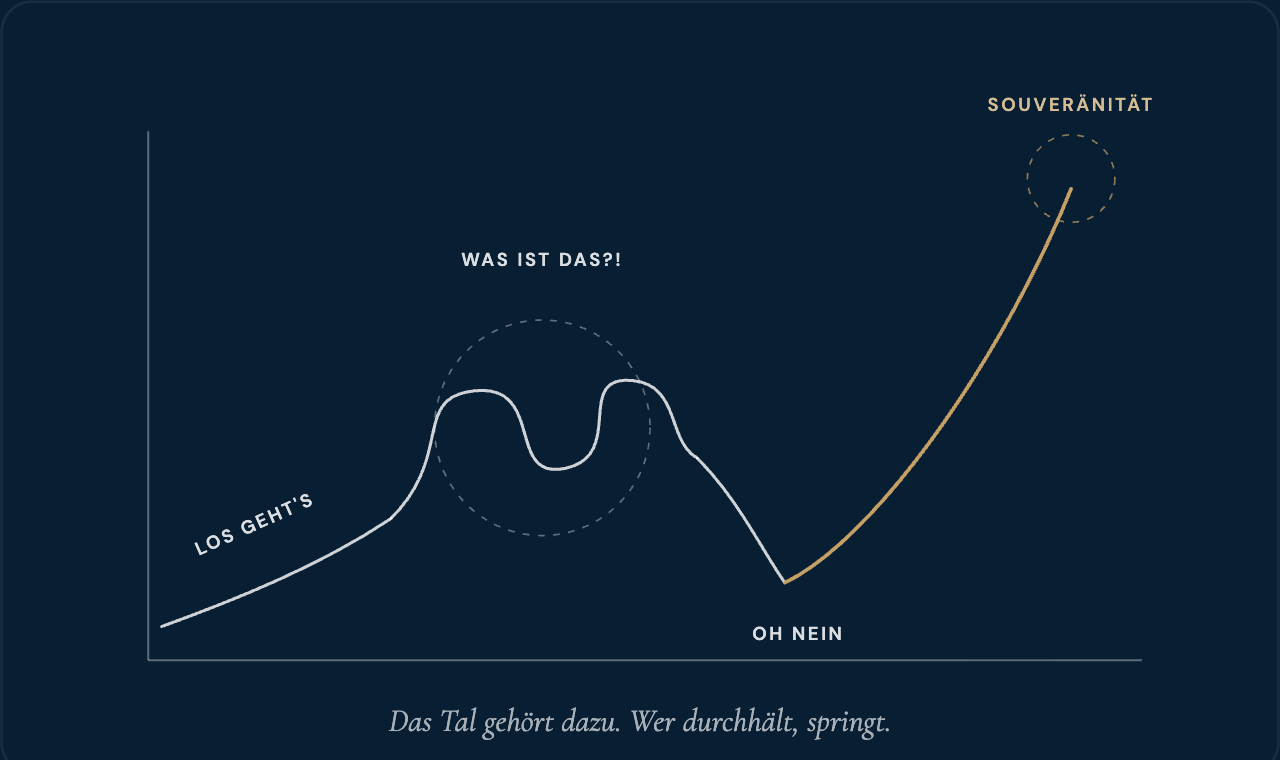
The Honest Learning Curve: The Start, The Tangled Mess, The Low Point, Then the Leap to Mastery

The complete course content

32 lessons in 6 sections, about 5 hours of video, plus three quizzes and a final exam. Click to see what interests you.

Section 1 · Orientation and Setup6 Lessons + Quiz · ~45 min
  • L1 · Why AI Isn't Saving You Time Yet (and When It Will) – The Real Reason Why AI Implementations Fail.
  • L2 · The Claude World: Browser, desktop app, chat, and cowork —the map plus the 7 course vocabulary terms.
  • L3 · Sparring Partner, Assistant, Team: Where Do You Stand? – Your Honest Self-Assessment and Your Course Goal.
  • L4 · When Claude Is the Wrong Choice – Green, Yellow, and Red Zones. Includes a decision-making chart.
  • L5 · The Right Account: Choosing a Subscription with the AVV Traffic Light System, Settings, Limits —Which Plan for Which Data?
  • L6 · The Right Model: Haiku, Sonnet, Opus, and Fable —the blind test and the model mix that preserves your limit.
  • Quiz 1: Four application questions on L1 through L6
Section 2 · First Real Exercises6 lessons · ~65 min
  • L7 · The Email That Writes Itself in 4 Minutes – Your First Instant Success, Right in Your Inbox.
  • L8 · 40 Pages in 5 Minutes: Summarize and Quiz – Upload a document, take a quiz, and review.
  • L9 · Research Using Sources: Web Search and Research Mode – Evidence-Based Answers Instead of Gut Feelings.
  • L10 · From a Sea of Numbers to a Conclusion: Analyzing Tables —Identifying Patterns, Formulating Conclusions.
  • L11 · Artifacts: Documents, spreadsheets, and mini-tools right in Claude —results you can interact with.
  • L12 · Cowork in Action: Claude works through a folder —delegating instead of dictating.
Section 3 · Prompting4 Lessons + Quiz · ~45 min
  • L13 · The Prompt That Gets It Right the First Time – Role, Context, Task, Format. Includes a cheat sheet.
  • L14 · What Claude Sees (and What It Doesn't): The Context Window —Why Claude "Forgets" and How to Work With It.
  • L15 · Refine Like a Pro: The Prompt Spiral —Iterate Strategically Instead of Starting Over.
  • L16 · Set it once, enjoy the benefits forever: System Prompt and Personalization —your permanent settings.
  • Quiz 2: Four application questions on L7 through L16
Section 4 · Knowledge and Tools: Your Own Assistant9 lessons · ~115 min
  • L17 · Your knowledge, stored rather than repeated —the shelf principle.
  • L18 · Creating Your Assistant: Setting Up a Claude Project —A Step-by-Step Guide.
  • L19 · Now it's your turn: Your own project for your assignment —the building session (45 to 60 minutes), with a worksheet and prompt library.
  • L20 · Setting up skills: Create your own or upload a pre-made skill —with or without a skill: the contrast.
  • L21 · Connecting Tools: What MCP Makes Possible —The Standard Connector, Explained Simply.
  • L22 · Your First Connector: From Idea to Connection —Integrate a Calendar or File System, Live.
  • L23 · You decide what Claude is allowed to do: Keep permissions under control —allow, ask first, block.
  • L24 · Ready-to-Use Packages: The Plugin Catalog – Role-playing plugins from Anthropic, all set up and ready to go.
  • L25 · Share with the team: Projects, prompts, and rules —from individual setups to team standards.
Section 5 · Limits and Safe Use2 Lessons + Quiz · ~20 min
  • L26 · When Claude Gets Creative: Recognizing and Grounding Hallucinations —The 3-Statement Test.
  • L27 · What’s allowed? The GDPR and EU AI Act Traffic Light System —the data traffic light for every workday. Includes a Safe Use Card.
  • Quiz 3: Five application questions on L17 through L27
Section 6 · Outlook and Conclusion5 Lessons + Final Test · ~40 min
  • L28 · Claude on Schedule: Setting Up Scheduled Tasks – The Weekly Report That Triggers Itself.
  • L29 · Delegate goals instead of dictating tasks: the Agent Loop —understand, plan, act, review.
  • L30 · Hands-on: Your First Agent – Delegate a Real Task and Experience the Loop Live.
  • L31 · From Assistant to Team of Agents —The Outlook.
  • L32 · Wrap-up: Your 7-Day Plan and Your Certificate – Your plan for Week 1 after the course.
  • Final Test: A score of 80 percent or higher earns you the certificate
"Latest News" Section: What's New on the ClaudeUpdate channel, including
  • L0 · What's New with Claude – updated regularly so your knowledge doesn't become outdated. Part of your lifetime access.

Included: 8 downloads (including the prompt library, cheat sheets, and the “Muster GmbH” practice data package) and the recommended 15-minute study plan spread over two weeks.

Here's how this course is structured

Why this course sticks with you more.

Every lesson follows the LHC learning loop: introduction, engagement, map, steps, recall, application, and reinforcement. This isn't a matter of personal preference, but rather evidence-based pedagogy.

Retrieval instead of passive exposure.Each lesson includes a prediction question, a recall question, and an immediate application. A meta-analysis of over 1,600 studies (Dunlosky et al. 2013) shows that recall works, while rereading hardly does.
Spaced out instead of a marathon.A recommended study plan spanning about two weeks, with review prompts on Day 3 and Day 7, following Ebbinghaus’s forgetting curve (Roediger and Karpicke 2008).
Small steps with a high success rate.Ready-made examples featuring think-alouds and scaffolding for your own use, based on Rosenshine’s teaching principles (2012).
A concept, an image, a sentence.No simply reading from slides, but rather language combined with images, following the multimedia principles of learning research.

We base our work on the insights from *Make It Stick* (Brown, Roediger, McDaniel, Harvard University Press 2014): productive effort rather than passive consumption. What feels too easy doesn’t stick.

Everything you need to get started.

  • 32 micro-lessons ranging from 5 to 10 minutes, about 5 hours of video, available anytime.
  • Your 15-minute study plan for two weeks, available for download.
  • 10 instant exercises using your own materials, right in every lesson.
  • "Muster GmbH" Practice Data Package —if you don't want to practice with real data; all data is fictitious and GDPR-compliant.
  • Downloads: Prompt Library, Prompt Anatomy Cheat Sheet, Safe Use Card, Claude vs. ChatGPT Decision Card, Account Checklist, 7-Day Activation Plan.
  • Three quizzes and a final test with explanatory texts to help you master what you've learned.
  • Certificate upon passing the final exam.
  • Lifetime access, including update lessons in the “Latest” channel, so your knowledge doesn't become outdated.

Nico Röpnack, Course Instructor

Your instructor

From someone who uses it every day.

Nico Röpnack heads Lighthouse Consulting and teaches at the DHBW. This semester, 25 students working in six teams with Claude built six functional departmental apps. That hands-on experience is exactly what this course is all about.

With over 20 years of experience in industry and operations, he understands what makes small and medium-sized businesses tick: tight deadlines, sensitive data, and a focus on results rather than gimmicks. Lighthouse Consulting is a registered partner in the Claude Partner Network.

A good briefing beats a clever prompt. Once you set Claude up properly, you'll save hours every week.

Anna, Course Coordinator, LHC Academy

Anna

Course Support · LHC Academy

Anna is in charge of our Academy and will guide you through the course: She’ll reach out to you after the course begins, answer questions about access, the study plan, and exercises, and gather your feedback. Before the launch, she worked through the entire course from a participant’s perspective.


Proof that you can show.

At the end, there is a final test with ten questions. Anyone who scores 80 percent will receive a certificate stating that the course was provided by a registered Anthropic partner and follows the LHC learning loop. Ideal for your personnel file or your professional development budget.

Explained in 5 Minutes

The Course in 5 Minutes.

Nico Röpnack takes you on a complete tour of the nautical chart: from finding your way around your home port to your own personal assistant.

4:50 minutes, with sound.

Here's what participants have to say about our Claude formats

★★★★★

“Nico Röpnack does a great job of explaining the wide range of possibilities offered by Claude and AI in a clear and well-organized way.”

Bernd Schmalenbach

Google Review, July 2026

★★★★★

“The Claude AI workshop was totally exciting and inspiring! It opened my eyes to possibilities I would never have thought of before. […] I highly recommend this workshop to anyone who wants to better understand AI and use it effectively.”

Anamaria Hager

Google Review, July 2026

★★★★★

“The Lighthouse Academy has shown us how to use AI tools in a truly meaningful way in our day-to-day work. No theoretical buzzword bingo—just knowledge we can put to immediate use.”

Jonas Ort

Google Review of Lighthouse Academy

★★★★★ 5.0 out of 5 stars from 27 Google reviews for Lighthouse Consultings. Read all reviews on Google

One price, everything included.

EUR 249 ( one-time fee)

No subscription. Lifetime access. Includes an invoice showing VAT and a certificate.

  • 32 lessons, about 5 hours of video
  • All Downloads and Practice Data
  • Three quizzes and a final test
  • Certificate after 80 percent
  • Lifetime access, including update lessons
  • Personalized course support from Anna at our Academy

Get access now

Instant access after purchase. Learn at your own pace—the study plan is a recommendation, not a requirement.

View all 32 lessons in detail

For Teams: Want to train your team? We offer a B2B team license with a dedicated invoice, or you can get started right away with a live training session. Go to the Claude training for teams · Contact us

Should your employer pay for the course?

Great idea: The results of the course stay within the company. To help get approval, we’ve summarized the key points on a single page: what you’ll be able to do after the course, how your team will benefit, and the cost of the investment. Feel free to forward this or print it out for your manager.

Download the decision document as a PDF

For multiple participants: Team license with a dedicated invoice—please contact us.

Frequently asked questions

Do I need a paid Claude subscription to participate?
A free Claude account is enough to work through most of the lessons. Some features, such as Research, Cowork, and Plugins, are available starting with the Pro plan. For real customer data, we recommend at least the Team plan; more on that in the next question. The course will show you exactly which plan is best suited for each purpose.
Is this GDPR-compliant? Can I enter company data?
That is precisely one of the core topics of the course. In short: The Free, Pro, and Max consumer plans do not include a data processing agreement. For personal or sensitive company data, the Team plan is the minimum requirement, because a data processing agreement is part of its terms and conditions. You’ll learn a simple data traffic light system that helps you make safe decisions for every task.
Do I need any prior knowledge?
No. The course starts from scratch. You'll need a computer, a Claude account, and a willingness to practice using your own material.
What language is the course taught in?
Entirely in German, tailored to small and medium-sized businesses in the DACH region.
How long will I have access?
Lifetime. You pay once and keep access, including the updated lessons in the “Latest” channel.
Is this something for developers?
The course is intentionally focused on chat and cowork—that is, day-to-day work that doesn't involve coding. It is not intended as a deep dive into Claude Code or the API.
Can we book this as a team?
Yes. We offer a B2B team license with a dedicated invoice. Please contact us.
How can I convince my employer to cover the cost of the course?
The result: After completing the course, you’ll be able to handle recurring tasks such as emails, reports, and research in a fraction of the time—and bring a fully configured, personalized Claude assistant to your workplace. Plus, you’ll know which data is allowed in which plan, which takes the biggest worry off your IT department’s shoulders. On this page, you’ll find the key points in PDF format to present to your manager. If you have several colleagues, the team license is a worthwhile investment.

Next step

Get started this week. In two weeks, you'll be working with your own assistant.

15 minutes a day. Using your own materials. With a clear plan and a certificate at the end. Questions about the team license? Email usat
. Already a participant? Go to the course login


Smartsheet Premier Solution Partner – Lighthouse Consultings on the Smartsheet Marketplace